
System Calls Demystified: 4 Essential Facts About the User-Kernel Bridge
How does your program actually *do* anything? We dive deep into the `syscall` instruction, kernel mode transitions, and the differences between Linux, macOS, and Windows system calls.
What exactly are system calls? In the previous post, we explored how our program finds functions like printf in shared libraries. But printf is just a wrapper. At some point, your program needs to talk to the hardware. It needs to write to the screen, read a file, or send a network packet.
Your program, running in User Mode (Ring 3), is not allowed to touch hardware directly. If it tries, the CPU throws an exception and kills it.
To access these superpowers, we must ask the Operating System kernel for help. We do this via System Calls.
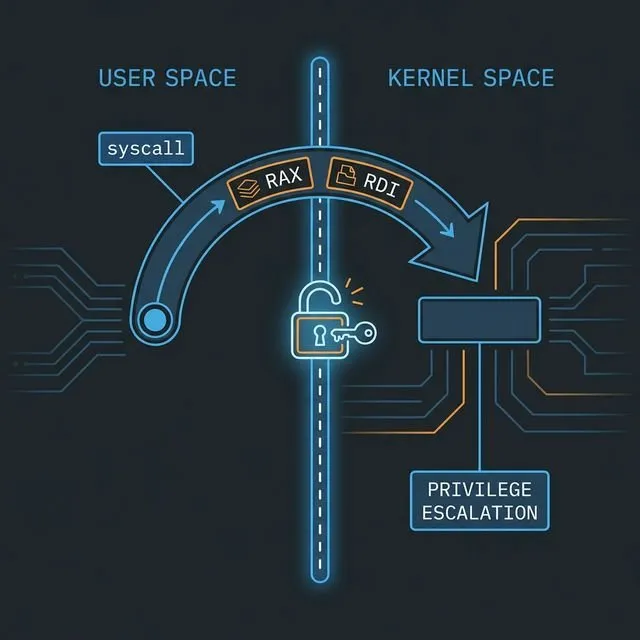
The Rings of Power
Modern CPUs enforce privilege separation using “Rings” (x86) or “Exception Levels” (ARM).
- Ring 3 / EL0 (User Mode): Your application lives here. Untrusted. Restricted.
- Ring 0 / EL1 (Kernel Mode): The OS kernel lives here. Total control.
To cross this boundary, we cannot just jmp to kernel code. We must use a special instruction that triggers a controlled transition.
The “Magic” Instructions:
- x86-64:
syscall - ARM64:
svc #0(Linux) /svc 0x80(macOS) - x86-32 (Legacy):
int 0x80
When you execute syscall, the CPU pauses your code, elevates privileges to Ring 0, and jumps to a predefined entry point in the kernel. The kernel checks your request, performs the action (if allowed), and returns to Ring 3.
The ABI: How to Make System Calls
Making system calls is like making function calls, but the Calling Convention (ABI) is different. We don’t use the stack for arguments here; we treat registers as the interface.
You need to know:
- Which Register holds the Syscall Number? (e.g., “I want to call
write”) - Which Registers hold the Arguments?
- Which Register holds the Result?
Let’s break it down by platform.
Linux x86-64
The standard for Linux servers and desktops. (See the comprehensive Linux x86-64 syscall table for a full list).
- Instruction:
syscall - Syscall Number:
rax - Arguments:
rdi,rsi,rdx,r10,r8,r9 - Return Value:
rax(Negative value usually indicates-errno)
Note: The kernel destroys
rcxandr11duringsyscall, so don’t expect them to survive!
Linux ARM64 (AArch64)
The standard for Android, Raspberry Pi, and AWS Graviton.
- Instruction:
svc #0 - Syscall Number:
x8 - Arguments:
x0throughx5 - Return Value:
x0
macOS (Apple Silicon & Intel)
macOS is based on BSD.
- Instruction:
syscall(x64) /svc 0x80(ARM64) - Syscall Number:
- x64:
rax=0x2000000+ Unix Number (Class 2). - ARM64:
x16= Unix Number. (The0x2000000“BSD Class” mask is often optional in practice on standard calls, but technically correct). - Arguments:
rdi/rsi...(x64) orx0/x1...(ARM64).
Why the 0x2000000? macOS effectively divides system calls into classes. The
0x2million class represents standard BSD/Unix system calls. On x64, you typically need it. On ARM64, the raw number (e.g.,4for write) usually works fine.
Code Example: mkdir("assembly_rocks", 0755)
Let’s prove this works. We will write a raw assembly program to create a directory.
1. Linux x86-64
mkdir is syscall #83.
section .data
  dirname db "assembly_rocks", 0

section .text
  global _start

_start:
  ; mkdir("assembly_rocks", 0755)
  mov rax, 83             ; Syscall ID: mkdir
  lea rdi, [rel dirname]  ; Arg1: path
  mov rsi, 0755o          ; Arg2: mode (octal; NASM uses 0755o suffix)
  syscall

  ; exit(0)
  mov rax, 60             ; Syscall ID: exit
  xor rdi, rdi            ; Status: 0
  syscall
2. Linux ARM64: The “at” Revolution
Here’s a catch. Modern architectures (like AArch64) often drop “legacy” syscalls like mkdir, open, or rename. Instead, they only support the relative versions: mkdirat, openat, renameat.
mkdirat takes an extra first argument: a directory file descriptor. To behave like normal mkdir, we pass the special constant AT_FDCWD (Current Working Directory), which is usually -100.
Syscall mkdirat is #34 on Linux ARM64.
.data
  dirname: .asciz "assembly_rocks"

.text
  .global _start

_start:
  ; mkdirat(AT_FDCWD, "assembly_rocks", 0755)
  mov x8, #34             ; Syscall ID: mkdirat
  mov x0, #-100           ; Arg1: AT_FDCWD
  ldr x1, =dirname        ; Arg2: path
  mov x2, #0o755          ; Arg3: mode (octal; use 0o prefix in GNU AS for octal)
  svc #0

  ; exit(0)
  mov x8, #93             ; Syscall ID: exit
  mov x0, #0
  svc #0
3. macOS ARM64 (Apple Silicon)
On macOS, mkdir is syscall #136 (decimal). The strict definition requires the BSD class (0x2000136), but the raw decimal number 136 works perfectly fine on ARM64.
.data
  dirname: .asciz "assembly_rocks"

.text
  .global _start
  .align 2

_start:
  ; mkdir("assembly_rocks", 0755)
  mov x16, #136           ; Syscall ID: mkdir
  adr x0, dirname         ; Arg1: path
  mov x1, #0o755          ; Arg2: mode (octal; use 0o prefix in GNU AS for octal)
  svc 0x80

  ; exit(0)
  mov x16, #1             ; exit
  mov x0, #0
  svc 0x80
Warning: Apple heavily discourages raw system calls. They serve as a private API layer. Systematic changes happen, and code signing/security checks (like App Sandbox) might trap raw system calls differently than those going through
libSystem. For learning? Great. For production? Link againstlibc.
The Windows Anomaly
If you try to find the syscall number for CreateDirectory on Windows, you’re entering a world of pain.
On Windows 10 Version 1803, NtCreateFile might be syscall 0x55. On Version 1903, it might be 0x56. On Windows 11, it’s different again. Windows system calls are unstable.
Using syscall directly on Windows is generally reserved for:
- Malware writers avoiding AV hooks.
- EDR/Anti-Cheat developers hooking the kernel.
- OS developers.
For everyone else, you MUST go through the User-Mode API (kernel32.dll, user32.dll).
The “Windows Way” (Pseudo-Assembly):
Instead of syscall, you setup registers (per the x64 calling convention) and call CreateDirectoryA.
sub rsp, 40       ; Shadow space
lea rcx, [path]   ; Arg1: PathName
xor rdx, rdx      ; Arg2: SecurityAttributes (NULL)
call CreateDirectoryA
add rsp, 40       ; Restore stack
We cover this thoroughly in Part 2 and Part 3.
Summary of System Calls
| Feature | Linux x64 | Linux ARM64 | macOS ARM64 | Windows x64 |
|---|---|---|---|---|
| Instruction | syscall |
svc #0 |
svc 0x80 |
syscall (but don’t use it!) |
| ID Register | rax |
x8 |
x16 |
eax |
| Arg 1 | rdi |
x0 |
x0 |
rcx (Function Call) |
| Arg 2 | rsi |
x1 |
x1 |
rdx (Function Call) |
| Arg 3 | rdx |
x2 |
x2 |
r8 (Function Call) |
| Number Stability | Stable | Stable | Mostly Stable | Unstable |
Understanding this bridge between your code and the kernel is the final key to demystifying how software works. You now know how to load a process, how to call functions, how memory is laid out, and finally, how to talk to the hardware.
In the next part, we will look at building a meaningful tool by combining all these concepts!